
Are you tired of fumbling with keys or worrying about lost or stolen keys? If so, it may be time to upgrade to the Lumive Smart Door Lock. This innovative security solution uses advanced technology to provide enhanced security, convenience, and more. Here are five benefits of using the Lumive Smart Door Lock:
- Enhanced security: The Lumive Smart Door Lock features biometric authentication, which means that only authorized users can gain access. This can help prevent unauthorized entry and reduce the risk of break-ins.
- Convenience: With the Lumive Smart Door Lock, you don’t have to worry about carrying around a physical key. You can use your fingerprint as a key or remotely unlock the door using your smartphone. This is especially useful if you have guests or service providers coming to your home, as you can easily grant them access without having to be there in person.
- Remote monitoring and control: The Lumive Smart Door Lock can be monitored and controlled using the Lumive smartphone app. With this app, you can easily check the status of your lock, receive notifications when the door is opened or closed, and even grant temporary access to friends or service providers.
- Increased energy efficiency: The Lumive Smart Door Lock can help you save energy and reduce your carbon footprint. It features automatic lock and unlock settings, which can help reduce the amount of time your lock is in use.
- Easy installation: The Lumive Smart Door Lock is easy to install and does not require any special tools or expertise. It can be easily retrofitted to your existing door and lock system, making the upgrade process quick and hassle-free.
In conclusion, the Lumive Smart Door Lock is the perfect choice for homeowners and business owners looking to enhance the security and convenience of their properties. With its advanced security features, convenient access options, and energy-saving features, the Lumive Smart Door Lock is a reliable and effective solution that you can trust.
Which Lumive Smart Lock Fits Your Door?
The benefits above only pay off if the lock matches your door. Before you buy, check whether the door is inside the home or exposed to the weather, and what kind of lock it has today. Here is a quick way to narrow it down:
| Your situation | Suggested Lumive lock | Why it fits |
|---|---|---|
| Main apartment or villa entrance, family use | Guardian G12 WiFi | Fingerprint access with built-in WiFi, managed from the Lumive app without a separate gateway |
| Want to see who is at the door | Guardian G12 with camera | Adds a camera and doorbell to the lock |
| Indoor door, keep the existing handle | Simplex S1 or Simplex V1 | Replace only the cylinder; the V1 adds a keypad and fingerprint |
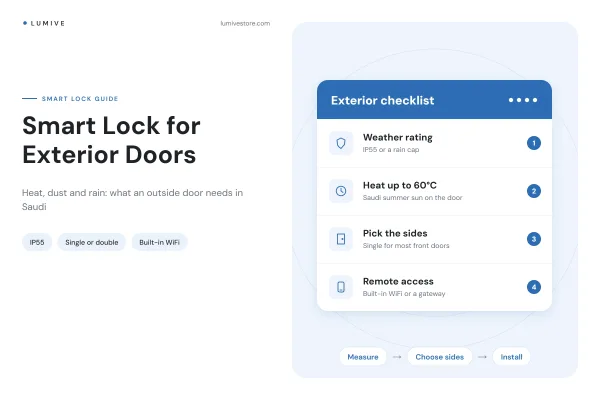
| Outdoor gate or door exposed to sun and dust | R9 exterior lock | Designed for exterior use with an IP55 rating |
| Short-term rental managed remotely | G12 TTLock Bluetooth with the G2 gateway | The gateway enables remote unlocking and code management for TTLock locks |
For a deeper comparison of door types, see our guide to choosing a smart lock by door type.
How Saudi Households Use Smart Locks Day to Day
- Large families: Every family member gets their own fingerprint, so nobody needs to carry or copy keys, and children cannot lose them.
- Domestic workers and drivers: Give a personal code that you can delete in seconds when the contract ends, instead of changing the whole lock.
- Guests and deliveries: Share a temporary code for a specific time window, which is handy during Ramadan gatherings and Eid visits.
- Summer travel: While you are away, the access log and alerts tell you exactly who entered and when, so you can let a relative check on the house without handing over a key.
Five Setup Tips to Get the Most From Your Lock
- Change the default admin code on day one and keep it private.
- Enroll at least two fingers per person, in case one finger is wet, cut or hard to read.
- Turn on notifications and review the access log every so often, especially in rentals and offices.
- Keep the mechanical backup key somewhere outside the home, such as your car.
- Replace batteries as soon as the app warns you, rather than waiting for them to run flat.
FAQ
Does a smart lock still work during a power cut?
Yes. Smart locks run on batteries, not mains power, so fingerprint and code entry keep working during a power or internet outage. Only remote features pause until the connection returns.
Can I give a guest access without being home?
Yes. With a WiFi lock or a Bluetooth lock paired with a gateway, you can create a temporary code from the app and send it to your guest, or unlock the door remotely.
Is a fingerprint lock safe for children and elderly family members?
Fingerprints are often the easiest option for them because there is nothing to remember or carry. You can add a code as a backup for anyone whose fingerprint is hard to read.
Can I install the lock myself?
Cylinder locks like the Simplex range are usually a straightforward DIY swap. Full mortise or exterior locks may need a technician, especially if the door has to be drilled or adjusted.
What happens if the batteries run out?
The app warns you in advance when batteries are low. If they do run out, you can still open the door with the mechanical backup key, then replace the batteries.
Upgrade Your Front Door Today
Pick the Lumive lock that suits your door and enjoy keyless, worry-free entry. Use code WELCOME10 at checkout on your first order.